-
011 477 0416 -
082 320 2424 -
info@taxassist.co.za -
Mon-Fri 09:00 - 16:00

Full shared access means that you, as well as your registered tax practitioner, can both work on your SARS eFiling profile. To request it, log in to SARS eFiling, go to Services and select the option to share your information with your tax practitioner, then choose full access and submit the request. You will receive a notification to approve the request, and once accepted your practitioner can view your tax types and file returns on your behalf. TaxAssist can walk you through each step and confirm the access is working correctly.
If you want TaxAssist to file your tax returns, we suggest that you have shared access to your profile
on SARS eFiling.
Once signed into eFiling, click on the Home tab, then click User on the left hand side
and select Tax Types in the drop down option.
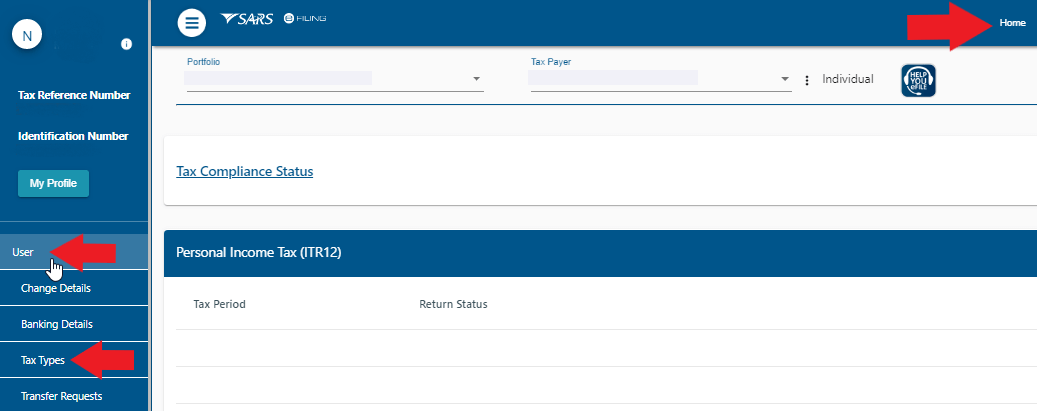
Next, click on Manage Tax Types to edit the access to your tax types.
Tick the Actions box and select Obtain Full Shared Access and click on submit, this will allow you to get shared access on your eFiling
account.
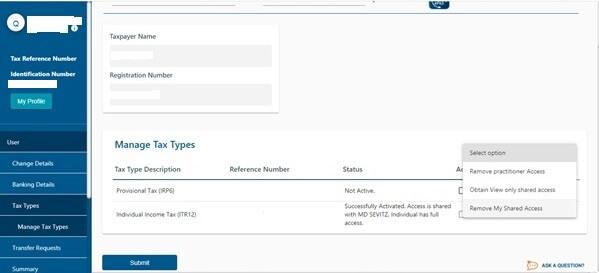
You will now be able to see all the returns that was done and all the correspondance from SARS.